
CEA Registration Process for Aspiring RES in Singapore


To register as a real estate salesperson (RES) in Singapore, you must pass both papers of the RES examination and have your licensed estate agent (EA) submit your registration through ACEAS. That is the non-negotiable sequence. CEA processes complete applications in approximately two to three weeks once all documents are in order, and the EA pays the registration fees on your behalf.
Here is who is responsible for each critical step:
You (candidate): Complete the RES course with a CEA Approved Course Provider (ACP), meet the age and education criteria, pass both RES exam papers, create your ACEAS individual profile using Singpass, and prepare all supporting documents.
Your licensed EA: Initiates and submits your registration application in ACEAS, attaches required documents, and pays the application fee ($60) plus the registration fee ($280 for a full year, or $140 if registration starts after June 30).
CEA: Reviews the complete submission, conducts fit-and-proper checks, and issues your registration certificate, typically within two to three weeks.
No candidate can self-register. The EA’s involvement is structural, not optional.
Key Takeaways
Completing the CEA registration process requires passing both RES exam papers, meeting age and education criteria, preparing the correct documents, and having your licensed EA submit and pay through ACEAS — with CEA processing complete applications in approximately two to three weeks.
Point | Details |
Exam first, registration second | Pass both RES exam papers before your EA can initiate your ACEAS registration. |
EA submits and pays | Your licensed EA initiates ACEAS submission and is invoiced for the $60 application fee plus the registration fee. |
Mid-year fee saving | Registering after June 30 reduces the registration fee from $280 to $140 for the first year. |
Processing takes ~2–3 weeks | CEA processes complete applications in approximately two to three weeks; incomplete submissions reset the clock. |
Myeracareer onboarding support | Myeracareer provides exam prep, ACEAS guidance, and recruiter coordination to reduce registration delays for new agents. |
Table of Contents
CEA eligibility rules, fit-and-proper checks, and documents to prepare
How ACEAS works and what your licensed EA does for your registration
If your application is delayed, rejected, or you need to report an agent
How Myeracareer helps you prepare for registration and onboarding
What recruiters see candidates get wrong — and how to avoid it
Myeracareer makes your first steps into real estate straightforward
The CEA registration process: step by step
The full workflow runs in a fixed sequence. Skipping or reordering steps causes delays, so track your progress against each checkpoint.
Enroll in a CEA Approved Course Provider (ACP) RES course. Choose from CEA’s list of ACPs. Attend at least 75% of scheduled sessions to qualify for your Certificate of RES Course Completion. Without that certificate, you cannot register for the exam.
Receive your Certificate of RES Course Completion. Your ACP issues this after you meet the attendance threshold. Keep the original; you will need it for exam registration.
Indicate interest in the RES exam via GovEntry (Stage 1). Log in with Singpass and submit your indication of interest during the open window. This is not yet registration; it is a shortlisting step.
Complete exam registration and payment on NTUC LearningHub (Stage 2). Shortlisted candidates receive instructions to register and pay on the NTUC LearningHub portal. Submit your education certificates or CEA assessment letter at this stage.
Sit and pass both RES exam papers. Both papers must be passed. A pass in one paper only does not qualify you for registration.
Create your ACEAS individual profile. Log in to ACEAS using Singpass. Set up your profile before your EA initiates the application; the system requires your profile to exist before the EA can link you to the submission.
Your EA initiates the registration application in ACEAS. The EA logs in via Corppass, starts the RES registration workflow, and links it to your profile.
Complete your portion of the ACEAS form and attach documents. You fill in required fields and upload supporting documents. Your EA reviews and verifies before final submission.
EA submits the application and pays fees. The EA submits the completed application and is invoiced for the $60 application fee and the applicable registration fee. GIRO deductions typically clear within a few working days.
CEA reviews and issues registration. With a complete submission, CEA processes the application in a few weeks. You can track status in your ACEAS dashboard.
Pro Tip: If your exam results arrive close to June 30, talk to your EA about whether it makes sense to time your submission to fall after that date. The registration fee drops from $280 to $140 for registrations starting after June 30, a straightforward first-year saving that costs you nothing but timing.
RES course requirements and how to register for the exam
The RES course is a prerequisite, not a formality. Your ACP will not issue the Certificate of RES Course Completion if you fall below that threshold, regardless of how well you perform in internal assessments.
What the course covers and what you receive:
Completion of the full RES course curriculum with a CEA ACP
A minimum 75% attendance record across all scheduled sessions
Certificate of RES Course Completion issued by the ACP upon qualifying attendance
The certificate is your proof of eligibility for exam registration; no certificate means no exam entry
The two-stage exam registration process:
Stage 1 — Indicate interest on GovEntry. Authenticate with Singpass. Submit your indication of interest during the published open window. Shortlisting is not guaranteed; CEA manages intake based on available exam capacity.
Stage 2 — Register and pay on NTUC LearningHub. Shortlisted candidates receive notification and must complete registration and payment on the NTUC LearningHub portal within the specified deadline. At this stage, submit your education certificates or, if your qualifications were assessed by CEA, your CEA assessment letter. NTUC LearningHub handles all exam enquiries, deferment requests, results, and appeals.
Check the RES exam dates for 2026 early so you can align your ACP course schedule with the next available exam window. Missing a Stage 1 window means waiting for the next intake, which can push your registration timeline back by months.
CEA eligibility rules, fit-and-proper checks, and documents to prepare
CEA’s eligibility criteria are clear and non-negotiable. Meet all four before your EA submits anything.
Core registration criteria:
Age 21 or above at the time of application
Minimum of four GCE O-Level passes, or an accepted equivalent qualification
Pass both papers of the RES examination
Registration must be under a licensed estate agent
Fit-and-proper assessment:
CEA’s fit-and-proper checks are substantive. Financial records, CPF MediSave status, and any past convictions or judgments involving dishonesty can prevent registration unless fully explained and documented. Specifically, CEA considers:
Any criminal convictions, including spent convictions in some cases
Court judgments involving dishonesty or fraud
Undeclared bankruptcy or insolvency proceedings
Outstanding CPF MediSave contributions
If any of these apply to you, do not assume they are automatic disqualifiers. Prepare a clear written explanation and supporting documentation for your EA to include with the submission. CEA assesses each case on its merits.
Supporting documents checklist:
Original education certificates (GCE O-Level or equivalent), or a CEA Educational Qualification Assessment letter for overseas or private qualifications
Certificate of RES Course Completion from your ACP
NRIC (Singapore citizens and PRs) or valid work pass and passport (foreigners)
Certificate of Non-Conviction and Credit (CNCC) for recent Singapore PRs and foreigners, as required
Employment contract or work pass documentation for foreign applicants
Any additional documents CEA requests following preliminary review
Pro Tip: If your qualifications were obtained overseas or from a private institution, submit the CEA Educational Qualification Assessment form before your EA initiates the ACEAS application. CEA takes approximately 15 working days to complete the assessment. Starting this early prevents a bottleneck at the submission stage.
How ACEAS works and what your licensed EA does for your registration
ACEAS is the central portal for all CEA licence and registration workflows. Individuals log in with Singpass; estate agencies use Corppass for corporate submissions. Understanding who does what inside ACEAS prevents the most common administrative delays.
The ACEAS workflow in sequence:
Candidate creates an individual ACEAS profile using Singpass before the EA initiates anything.
EA logs into ACEAS via Corppass and initiates the RES registration application, linking it to the candidate’s profile.
Candidate logs back into ACEAS to complete required fields and upload supporting documents.
EA reviews the completed application, verifies all documents, and submits.
CEA receives the submission, generates an invoice to the EA, and begins processing.
Both candidate and EA can track application status via their respective ACEAS dashboards.
Common ACEAS pitfalls and how to avoid them:
Wrong profile type: Creating a corporate profile instead of an individual profile blocks the EA from linking your application. Use Singpass for your personal profile only.
Missing GIRO setup: The EA’s agency must have an active GIRO arrangement with CEA. If GIRO is not set up, fee payment stalls and the application sits in a “Pending fee payment” status.
GIRO deduction timing: GIRO deductions take two to three working days to clear. Submitting close to a processing deadline without accounting for this window can delay your registration start date.
Incomplete document uploads: ACEAS will not progress an application with missing attachments. Review the document checklist before the EA submits.
Pro Tip: When evaluating which EA to join, ask directly how they manage ACEAS submissions for new agents. An EA with a structured onboarding process will have a compliance officer or team leader who walks you through each ACEAS step. That support is worth more than you might expect during your first registration.
Fees, payment responsibility, and processing timelines
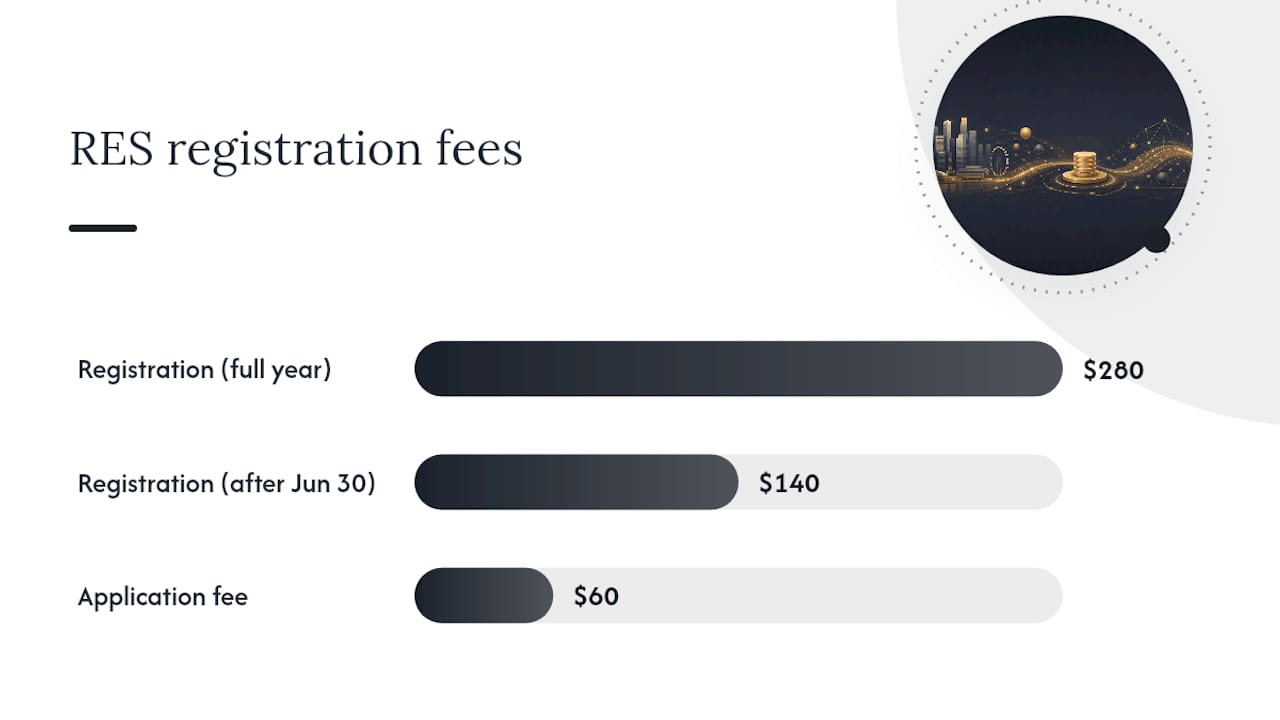
The fee structure for RES registration is straightforward, but the mid-year cutoff creates a genuine planning opportunity.
Fee breakdown:
Application fee: $60, paid by the EA at submission
Registration fee: $280 for a full registration year (January 1 to December 31), or $140 if registration starts after June 30
Who pays: The EA is invoiced and pays CEA directly. Whether the EA passes this cost to you depends on the agency’s policy; clarify this before signing with any EA.
CEA generates invoices on scheduled days, and GIRO deductions follow within a few working days. A submission that lands just before a scheduled invoice run will be picked up in that cycle; one that misses it waits for the next.
Processing timeline:
CEA typically processes complete applications in a few weeks. “Complete” means all documents are attached, the EA has verified the submission, and the fee payment has cleared. An incomplete submission resets the clock.
Pro Tip: GIRO deductions can take two to three working days to clear after the invoice is generated. If your EA submits close to a month-end or a public holiday cluster, build in extra buffer. A “Pending fee payment” hold is one of the most avoidable delays in the entire process.
Registering after June 30 cuts the first-year registration fee in half. If your exam results arrive in May or June, it may be worth waiting a few weeks to submit, depending on when you plan to start transacting. Discuss the trade-off with your EA.
What happens after CEA issues your registration

Receiving your RES registration is the starting line, not the finish. Several ongoing obligations apply from day one.
Continuing professional development (CPD):
CEA mandates CPD requirements for all registered salespersons. You must complete the required CPD hours each registration year. Failure to meet CPD obligations affects your renewal eligibility.
Renewal timing and consequences:
CEA’s renewal exercise typically runs from October to November each year. Registrations that are not renewed by January 1 lapse, and you cannot perform estate agency work until renewal is approved. Late submissions during a high-volume renewal period may not clear in time.
Complete CPD requirements before the renewal window opens
Settle all outstanding CPF MediSave contributions ahead of October
Confirm your EA has initiated the renewal in ACEAS on your behalf
Track renewal status in your ACEAS dashboard
Verifying your registration and your EA’s licence:
Use the CEA Public Register to confirm your registration is active and your EA holds a valid licence. This is also what clients use to verify you before engaging your services. Check it after your registration is issued and again after each renewal.
Switching EAs:
If you move to a different agency, your current EA must deregister you in ACEAS and your new EA must initiate a fresh registration. The process mirrors the original registration workflow. Experienced agents considering a switch can find practical guidance on switching agencies and what to expect from the ACEAS mechanics involved.
Becoming a practising director or partner:
RESs who later become practising directors or partners of an estate agency must meet additional Key Executive Officer (KEO) and director requirements under the Estate Agents Act. This is a separate licensing track from RES registration.
If your application is delayed, rejected, or you need to report an agent
Most delays are administrative and fixable. A rejected application is rarer but requires a structured response.
Steps to take for a delayed or stalled application:
Log into ACEAS and check your application status. Note the exact status message; “Pending fee payment,” “Pending documents,” and “Under review” each require a different response.
Confirm with your EA that the submission was completed and all documents were attached. A common cause of delay is an EA submitting before the candidate has uploaded all required files.
If CEA has requested additional documents, respond within the timeframe stated in the request. Every day of delay on your end extends the processing clock.
If the application has been under review for significantly longer than three weeks with no status update, contact CEA directly through the “Reach us” section on the CEA website.
For rejected applications:
Request a written explanation from CEA if one was not provided.
Address each stated reason specifically. A rejection for missing documents is resolved differently from one involving fit-and-proper concerns.
For complex cases involving foreign qualifications or prior convictions, ask your EA to request a preliminary eligibility assessment from CEA before resubmitting.
Lodging a complaint about an agent or agency:
Use official CEA channels. The CEA website’s “Reach us” section is the correct starting point for complaints. Before lodging, gather:
Written agreements or contracts
Transaction records and correspondence
Dates, amounts, and names of parties involved
Any receipts or proof of payment
CEA does not operate an open public dispute portal. All complaints go through formal channels, and CEA will advise on next steps after reviewing your submission.
How Myeracareer helps you prepare for registration and onboarding
Navigating the CEA registration process is manageable when you have the right support behind you. Myeracareer, ERA’s career platform, works directly with candidates and their assigned EAs to reduce the friction that causes most first-time registration delays.
What Myeracareer provides:
RES exam preparation guidance, including study resources and exam logistics support
Step-by-step ACEAS onboarding assistance, from profile creation through document upload
Mentorship from experienced ERA agents who have been through the same process
First-year administrative support covering CPD tracking, MediSave reminders, and renewal preparation
Recruiter coordination with your EA during ACEAS submission to catch document gaps before they become rejections
Before reaching out, have the following ready: your Certificate of RES Course Completion, your NRIC or passport, and your education certificates or CEA assessment letter. That preparation shortens the onboarding conversation considerably.
A clear note: Myeracareer assists with preparation and administrative support. All CEA requirements, eligibility checks, and registration decisions remain with CEA. Myeracareer does not replace or shortcut any part of the official process.
What recruiters see candidates get wrong — and how to avoid it
Most registration delays are not caused by eligibility problems. They come from documentation gaps and timing missteps that a little preparation eliminates entirely.
The most frequent errors I see candidates make are predictable. Missing the CNCC is the most common for recent Singapore PRs and foreigners; many candidates simply do not know it is required until the EA flags it after submission, by which point the application is already stalled. The fix is simple: ask your EA for the complete document checklist before you start the ACEAS process, not after.
Incomplete educational assessments are the second pattern. Candidates with overseas or private qualifications submit to ACEAS before CEA has completed the Educational Qualification Assessment. That assessment takes around 15 working days. Submitting before it arrives means the application sits incomplete, and the processing clock does not start until CEA has everything.
Late MediSave contributions surface most often at renewal, not initial registration, but they can affect fit-and-proper assessments too. Keep your CPF MediSave contributions current from the moment you register. It is one of the few compliance items entirely within your control.
On the ACEAS side, small corrections matter. An EA who knows the system well will catch a wrong profile type or a missing GIRO arrangement before submitting. That is not a minor administrative detail; it is the difference between a two-week processing window and a six-week one.
The most practical advice I can give on choosing an EA: ask them directly how many new RES registrations they have processed in the last year and what their ACEAS rejection rate looks like. An EA who cannot answer that question has not been paying attention to the part of the process that affects you most.
Myeracareer makes your first steps into real estate straightforward
Passing the RES exam is an achievement. Getting registered without unnecessary delays is a skill, and it starts with choosing the right EA and onboarding partner. Myeracareer gives new agents the exam preparation, ACEAS guidance, and recruiter support that turns a complex administrative process into a clear sequence of steps.

ERA’s onboarding team works alongside you and your EA from the moment you complete your RES course through your first registration and beyond. You get structured exam prep, document checklists built around CEA’s actual requirements, and hands-on ACEAS support that reduces the risk of administrative rejection. For agents who want to start transacting as quickly as possible after passing, that support is the practical difference between a smooth two-week registration and a drawn-out back-and-forth with missing documents.
Ready to begin? Visit Myeracareer’s new agent page to connect with a recruiter and get your onboarding started.
Sources
These are the primary official resources for every stage of the CEA registration process. Bookmark them before you start.
Recommended
Comments